GitHub Actions - Entra ID Export
Note
Updated on 2023/12/11 to use EntraExporter, instead of the deprecated AzureADExporter
Microsoft has released EntraExporter, a tool that exports your Entra ID configuration settings to .json files. This allows you to track changes to your environment using a source control solution like git, and serves as a reference in case you lose any settings.
Microsoft cautions that this doesn’t constitute a backup or disaster recovery solution, as there’s no way to automatically import from these .json files, but I think it’s a useful resource to have on hand regardless.
This guide will detail setting up the tool to run automatically with GitHub Actions.
GitHub Repository Setup
In order to set up the authentication between GitHub Actions and Entra, we first need to have a GitHub repository. The reasons will become apparent when we get to OIDC in the next step.
For now, create a new GitHub repository and initialise it with a README.md file. For this example I’ll use https://github.com/wipash/entra-export-example
Entra Setup
Entra Exporter needs to communicate with your Entra Tenant somehow, and the best way to do that is the an App Registration. So that we don’t have to remember to rotate a secret or certificate, we’ll use OIDC to authenticate between GitHub Actions and this new App Registration.
The examples below all use the az cli, but you can do all of this through the Entra GUI also.
Create a new app registration, record the
appIdfrom the output (I’ll pretend my appId is11111111-1111-1111-1111-111111111111for this example), as well as the app’sobjectId(which we’ll only need for the OIDC configuration part later on):az ad app create --display-name "GitHub Entra Export Example"Entra Exporter requires the following MS Graph API permissions, added as Application permissions:
AccessReview.Read.All
Agreement.Read.All
APIConnectors.Read.All
Directory.Read.All
EntitlementManagement.Read.All
IdentityProvider.Read.All
IdentityUserFlow.Read.All
Organization.Read.All
Policy.Read.All
Policy.Read.PermissionGrant
PrivilegedAccess.Read.AzureAD
PrivilegedAccess.Read.AzureResources
User.Read.All
UserAuthenticationMethod.Read.All
Grant the required MS Graph API permissions to the new app (the backtick
`character is the PowerShell word-wrap operator. Replace it with\if you’re usingbash):az ad app permission add --id 11111111-1111-1111-1111-111111111111 ` --api 00000003-0000-0000-c000-000000000000 ` --api-permissions ` 2f3e6f8c-093b-4c57-a58b-ba5ce494a169=Role 498476ce-e0fe-48b0-b801-37ba7e2685c6=Role ` 246dd0d5-5bd0-4def-940b-0421030a5b68=Role e321f0bb-e7f7-481e-bb28-e3b0b32d4bd0=Role ` df021288-bdef-4463-88db-98f22de89214=Role d07a8cc0-3d51-4b77-b3b0-32704d1f69fa=Role ` 7ab1d382-f21e-4acd-a863-ba3e13f7da61=Role 1b0c317f-dd31-4305-9932-259a8b6e8099=Role ` 4cdc2547-9148-4295-8d11-be0db1391d6b=Role 5df6fe86-1be0-44eb-b916-7bd443a71236=Role ` 38d9df27-64da-44fd-b7c5-a6fbac20248f=Role c74fd47d-ed3c-45c3-9a9e-b8676de685d2=Role ` 9e640839-a198-48fb-8b9a-013fd6f6cbcd=Role b86848a7-d5b1-41eb-a9b4-54a4e6306e97=RoleNote
00000003-0000-0000-c000-000000000000is the actual ID of the MS Graph API, not a placeholderTip
You can show all available MS Graph API permissions using:
az ad sp show --id 00000003-0000-0000-c000-000000000000 --query 'appRoles[].{ID:id, Name:value}' --output tableGrant admin consent for your tenant for the roles we just assigned:
az ad app permission admin-consent --id 11111111-1111-1111-1111-111111111111Now we come to the OIDC (federated credentials) configuration. This establishes a trust between Entra and the GitHub identity provider, so that we don’t need to maintain a secret or certificate on the GitHub side in order to authenticate to this application. Microsoft’s documentation has more info.
As this feature is still in preview,
azcli doesn’t yet have a specific command to configure it. We can still useaz, it’s just a little more convoluted. This step might make more sense to configure using the Entra web interface.You will need to use your app’s
objectIdrather than theappIdthat we’ve been using so far.You will also have to have the following info handy from your new GitHub repository:
- Your GitHub org’s name (or your username)
- Your repository name
- Your default branch name
az rest --method POST --uri 'https://graph.microsoft.com/beta/applications/<ObjectID>/federatedIdentityCredentials' --body '{\"name\":\"GitHubActionsFederation\",\"issuer\":\"https://token.actions.githubusercontent.com\",\"subject\":\"repo:wipash/entra-export-example:ref:refs/heads/main\",\"description\":\"GitHub Actions federated credential\",\"audiences\":[\"api://AzureADTokenExchange\"]}'To better explain the body of the above request:
 {
   // The name of your federated credential
   "name": "GitHubActionsFederation",
   // The issuer of the credential, in this case GitHub Actions
   "issuer": "https://token.actions.githubusercontent.com",
   // Your GitHub account and repo, and the branch name that your Action
   //  will run against, in this case 'main'
   "subject": "repo:wipash/entra-export-example:ref:refs/heads/main",
   // Description of the use of the federated credential
   "description": "GitHub Actions federated credential",
   // The audience of the external token, leave as the default 'api://AzureADTokenExchange'
   "audiences": ["api://AzureADTokenExchange"]
 }
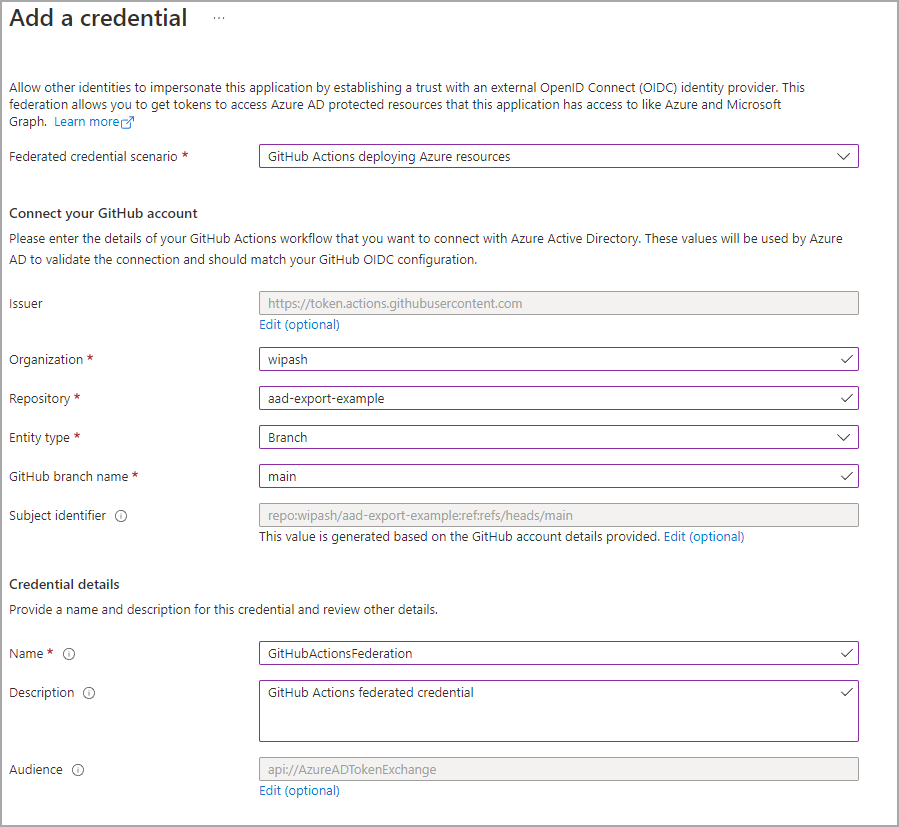
If you want to configure this through the Entra GUI, navigate to your app registration -> Certificates & secrets -> Federated credentials -> Add credentials, and fill out the form as follows:
Setting Value Federated credential scenario GitHub Actions deploying Azure resources Issue Leave as default Organization your-github-org Repository your-github-repo Entity type Branch GitHub branch name main Subject identifier Leave as default Name GitHubFederation Description GitHub Actions federated credential Audience Leave as default For example:
GitHub Actions Setup
That’s all we need to do on the Entra side, the rest is just configuring GitHub actions to run our export on a schedule.
The azure/login@v1 action that we’ll use is already OIDC aware, we just need to give it our app’s ID, our tenant ID, and our Azure subscription ID.
To facilitate this, create three secrets in your repository, and add the relevant details to them:
AZURE_CLIENT_IDAZURE_TENANT_ID
I’m using the following script to log in to MS Graph using the access token retrieved by azure/login@v1, and then export our AD config. I’ve chosen to export pretty much all types of config supported by Export-AzureAD, with the exception of users, serviceprincipals, pim, pimazure, and pimaad, as they export way too much data (and subsequently the export takes hours to run).
I’m also using my own fork of the https://github.com/microsoft/azureadexporter repository, as there’s currently a bug in the official repo that doesn’t sort dictionaries properly, resulting in messy diffs as properties sometimes move up and down in the output files. Once #16 is merged (or another fix is implemented), I will switch back to using the official repo via Install-Module AzureADExporter.
This fix has now been merged!
## Install MS Graph auth module, and log in to MS Graph
Install-Module Microsoft.Graph.Authentication -Scope CurrentUser -Force
$token = (Get-AzAccessToken -ResourceTypeName MSGraph).Token | ConvertTo-SecureString -AsPlainText -Force
Connect-MgGraph -AccessToken $token
Get-MgContext
$global:TenantID = (Get-MgContext).TenantId

## Ensure output folder exists, and remove existing output files
Write-Host '## Cleaning out output folder'
$OutputPath = Join-Path $env:GITHUB_WORKSPACE -ChildPath 'AAD Config'
[System.IO.Directory]::CreateDirectory($OutputPath) | Out-Null
Get-ChildItem $OutputPath | Remove-Item -Recurse -Force

## Install AzureADExporter
Write-Host '## Installing AzureADExporter'
Install-Module AzureADExporter -Scope CurrentUser -Force

## Export AAD Config
Write-Host '## Exporting Entra config'
Write-Host "# Export-AzureAD -Path $OutputPath -Type 'AccessReviews', 'ConditionalAccess', 'Groups', 'Applications', 'B2C', 'B2B', 'AppProxy', 'Organization', 'Domains', 'EntitlementManagement', 'Policies', 'AdministrativeUnits', 'SKUs', 'Identity', 'Roles', 'Governance'"
Export-AzureAD -Path $OutputPath -Type 'AccessReviews', 'ConditionalAccess', 'Groups', 'Applications', 'B2C', 'B2B', 'AppProxy', 'Organization', 'Domains', 'EntitlementManagement', 'Policies', 'AdministrativeUnits', 'SKUs', 'Identity', 'Roles', 'Governance'
The full workflow file is saved in .github/workflows/aad_export.yaml, and looks like this:
name: Entra Config Backup

on:
  # Allow manual backups to be triggered from GitHub's Actions page
  workflow_dispatch:

  # Runs daily at 4pm UTC
  schedule:
    - cron: "0 16 * * *"

permissions:
  # id-token permission is required for OIDC
  id-token: write
  # contents permission is required to commit changed files
  contents: write

jobs:
  backup-aad-config:
    name: Backup Entra Config
    runs-on: windows-latest
    steps:
      - uses: actions/checkout@v3

      - name: Azure Login using OIDC
        uses: azure/login@v1
        with:
          client-id: ${{ secrets.AZURE_CLIENT_ID }}
          tenant-id: ${{ secrets.AZURE_TENANT_ID }}
          # Let us use Azure PowerShell to retrieve the access token in the next step
          enable-AzPSSession: true
          # This app doesn't have any roles, so no subscriptions show up when you log in.
          #  Normally that state would fail this step, but we can allow it to continue with this option
          allow-no-subscriptions: true

      - name: Log in to MS Graph and back up Entra
        uses: Azure/powershell@v1
        with:
          azPSVersion: "latest"
          inlineScript: |
            ## Install MS Graph auth module, and log in to MS Graph
            Install-Module Microsoft.Graph.Authentication -Scope CurrentUser -Force
            $token = (Get-AzAccessToken -ResourceTypeName MSGraph).Token | ConvertTo-SecureString -AsPlainText -Force
            Connect-MgGraph -AccessToken $token
            Get-MgContext
            $global:TenantID = (Get-MgContext).TenantId

            ## Ensure output folder exists, and remove existing output files
            Write-Host '## Cleaning out output folder'
            $OutputPath = Join-Path $env:GITHUB_WORKSPACE -ChildPath 'AAD Config'
            [System.IO.Directory]::CreateDirectory($OutputPath) | Out-Null
            Get-ChildItem $OutputPath | Remove-Item -Recurse -Force

            ## Install AzureADExporter
            Write-Host '## Installing AzureADExporter'
            Install-Module AzureADExporter -Scope CurrentUser -Force

            ## Export AAD Config
            Write-Host '## Exporting Entra config'
            Write-Host "# Export-AzureAD -Path $OutputPath -Type 'AccessReviews', 'ConditionalAccess', 'Groups', 'Applications', 'B2C', 'B2B', 'AppProxy', 'Organization', 'Domains', 'EntitlementManagement', 'Policies', 'AdministrativeUnits', 'SKUs', 'Identity', 'Roles', 'Governance'"
            Export-AzureAD -Path $OutputPath -Type 'AccessReviews', 'ConditionalAccess', 'Groups', 'Applications', 'B2C', 'B2B', 'AppProxy', 'Organization', 'Domains', 'EntitlementManagement', 'Policies', 'AdministrativeUnits', 'SKUs', 'Identity', 'Roles', 'Governance'

      - name: Commit changes
        uses: EndBug/add-and-commit@v9
        with:
          message: Update Entra configuration
          default_author: github_actions